
Free Database Activity Monitoring (DAM) Solution
Know who’s doing what—inside your database.
20 FREE licenses available for small businesses with up to $10 million USD in gross revenue (premium support not included).
Mamori.io’s Free DAM Solution is Built for Businesses Seeking to:
Track Access to Sensitive Data
See who accessed what, when, and from where—across all your databases. Because Mamori uses Single ID, there will be no credential sharing, and all database access are tracked by identity.
Flag Suspicious Queries and Patterns
Relevant stakeholders will be immediately notified of out-of-hours access, mass exports, deletion, or other abnormal activities. These abnormal activities are also instantly blocked.
Protect Against Internal & External Threats
Unsolicited access and malicious activities are instantly identified and blocked. All database activities are tracked to easily catch credential abuse, privilege misuse, and unauthorized actions before damage spreads.
Get Eyes on Every Query
All database operations and SQL commands are tracked, logged, and monitored.
Maintain Compliance & Audit-Readiness
Keep searchable, timestamped logs of every query, change, and access event for compliance frameworks and audit-ready reporting.
Core Features
Real-Time Query Monitoring & Blocking - Real-time monitoring on all database activities — SELECT, INSERT, UPDATE, DELETE, EXECUTE and all SQL queries — to detect and instantly block unusual and suspicious queries or activities.
Single ID Access - Our zero-trust approach ensures that all access to databases are verified by identity, not credentials. No more shared accounts and the risks associated with it.
Anomaly Detection and Behavioral Analytics – Spot unusual access patterns like excessive data dumps, privilege escalations, or access outside business hours. Identify anomalies based on user, device, frequency, and volume.
Real-Time Alerts on Unusual Access Patterns – Any unsolicited access or unusual patterns, like weekend data pulls or bulk deletions, will trigger a notification to relevant stakeholders, and the device will be locked from further access and administration notified.
Detecting “Slow Steals” from Insiders – Sometimes, insiders steal data slowly to bypass anomaly detection. Mamori has algorithms that detects these “slow steals” and notifies the admins.
Session Recording, Logs, Audit & Playback
Get full query history per user. All user, device, or application access and their operational activities are logged and recorded, including session recording for compliance and investigation so you know exactly who did what and when.
No Schema Changes or Agents - Enabling enhanced security and access management without the need to deploy agents or requiring updates to servers, databases or endpoints.
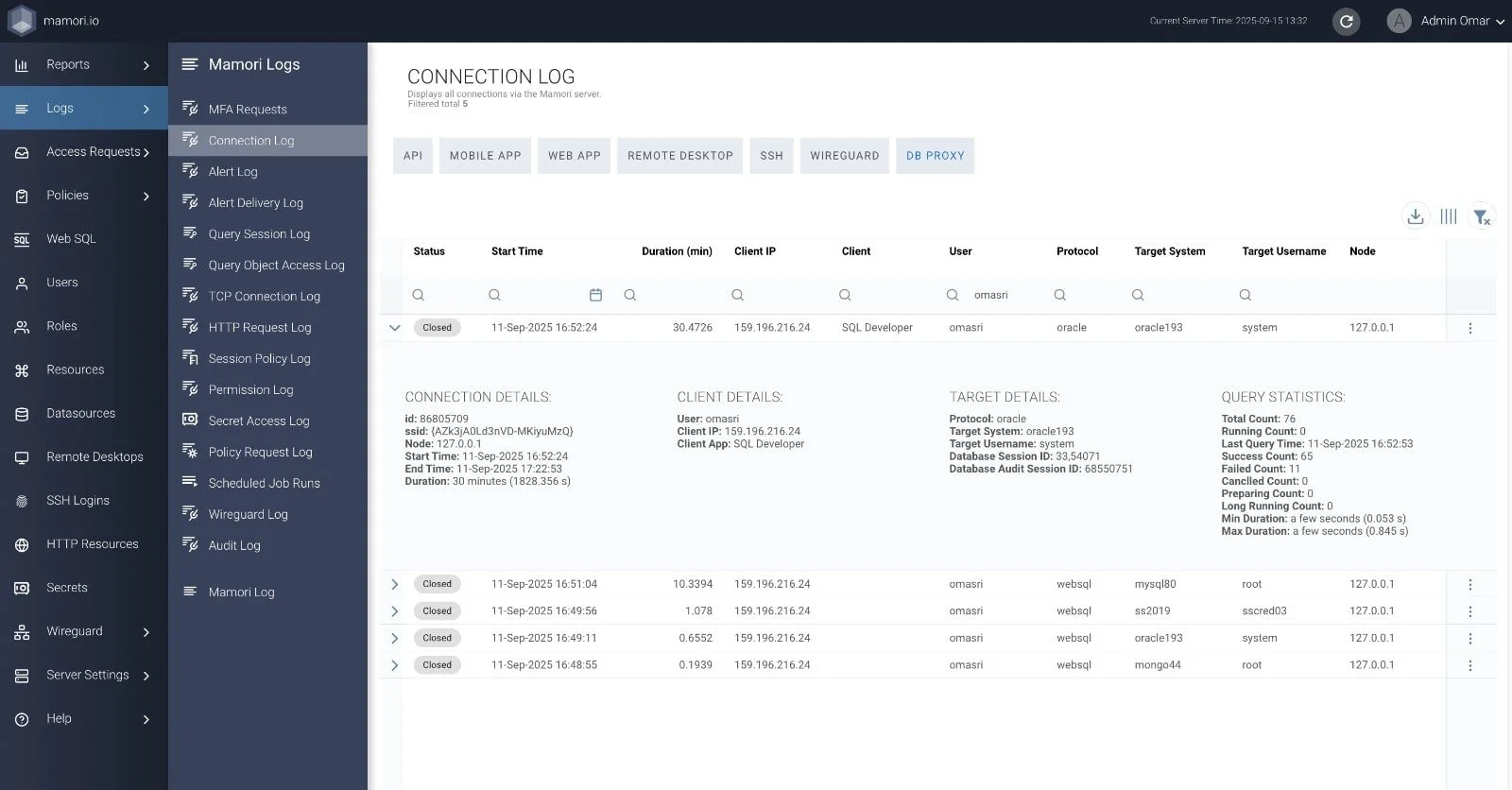
Mamori Connection Log (above) shows time of access and connection used, user, and device used to access.
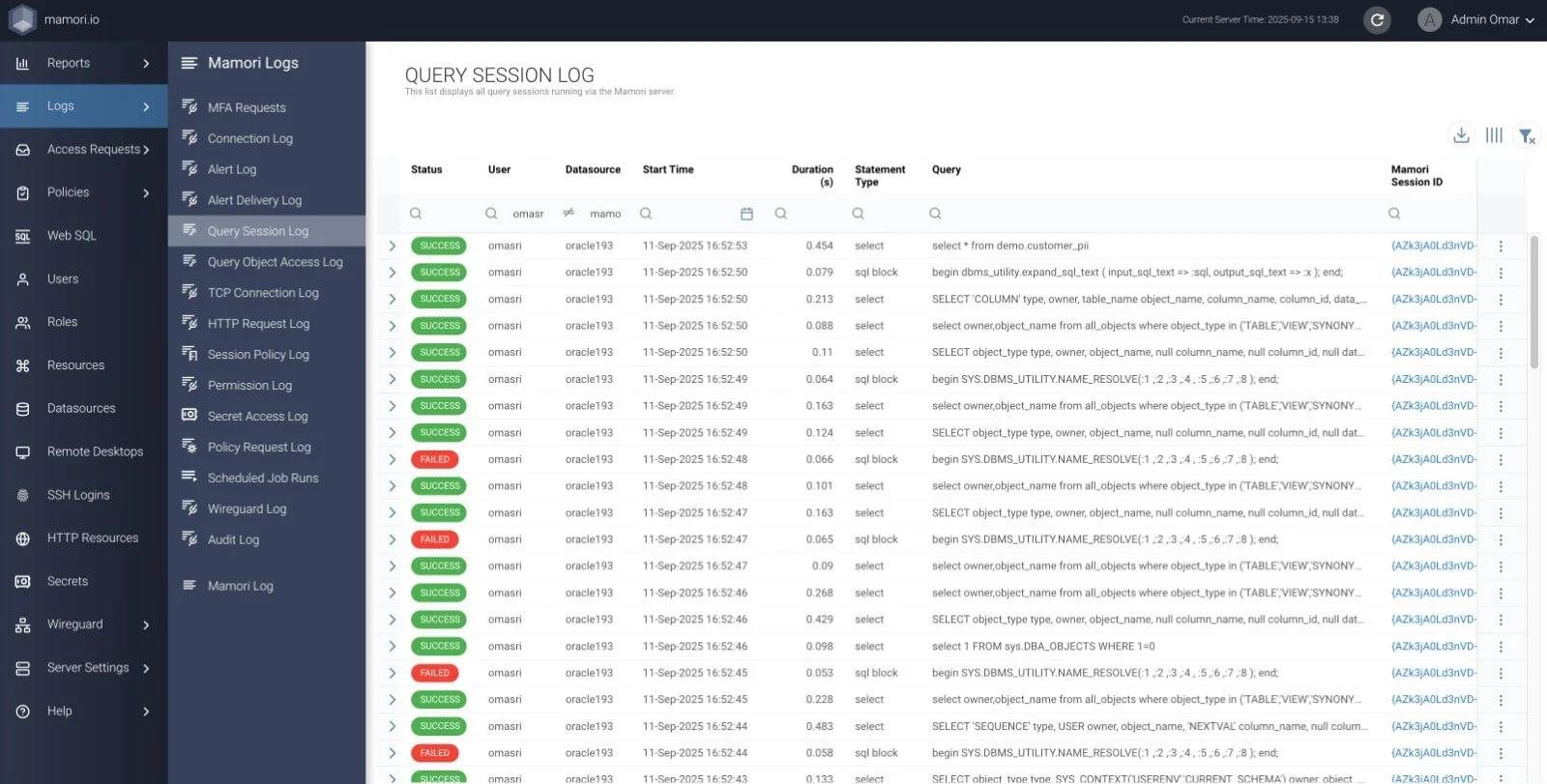
Mamori Query Session Log (above) shows data operations executed and automatically blocks any unauthorized access.
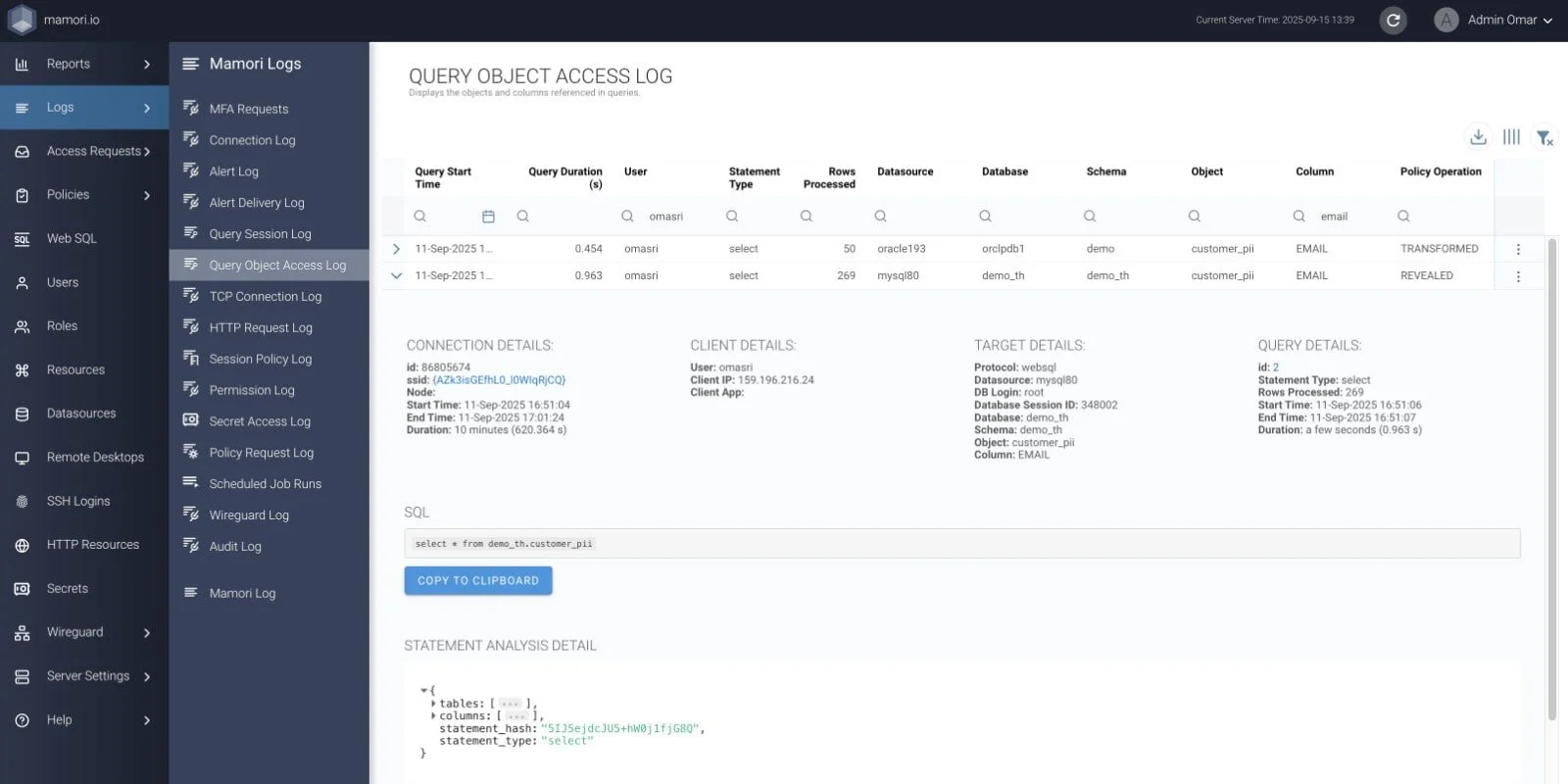
Mamori Query Object Access Log (above) not only connection, client, and target details, but also the query details.
“At Mamori, we assume every password is already compromised or will be compromised one day. Every access is secured by MFA, from accessing the network using Zero Trust Network Access (ZTNA) to accessing the database using our Database Privileged User Access (DB PAM) via SSO. Even certain operations within the database, such as mass deleting data, can be authorized to certain individuals and secured using 2FA.”
- mamori.io
How We’re Different
All-in-One Solution – While most database tools focus on one feature, Mamori’s solution delivers full access control, active blocking, and live response—all in one free module. Mamori’s solution also delivers Zero Trust Network Access (ZTNA), Privileged Access Management (PAM), database PAM (DB PAM), data privacy solution, workflow automation solutions, and Intrusion Detection.
End‑to‑End Protection – We secure everything with an IP address, such as desktops, laptops, mobile devices and tablets, Internet of Things (IoT), servers, and databases, and enforce database security as the final line of defense.
2FA Everything - We at Mamori.io believe passwords are inherently insecure - either compromised or will be compromised one day. That is why all access are secure with Two-Factor Authentication (2FA) to verify each access by identity.
Workflow Automation - Automate and simplify ISO 27001 A.9 access controls with the ability to terminate unused privileged accounts automatically.

Fast and Frictionless Implementation in 3 Simple Steps with No Network Changes:
Deploy a Mamori Server – After downloading your free DAM solution, install it in one of your servers, whether on-premise or cloud. No agents. No changes to servers, directories, or databases required. Setup an admin account and configure 2FA and alert settings.
Integrate with Existing Directory or Create New Identities – Your existing directory and access settings can be easily rolled over.
Define Access Controls – After defining roles and identities, configure what these roles can access and what they can do with those data.

Request Your Free Database Activity Monitoring (DAM) Solution Now
What happens after you fill out this form:
Your email will need to be verified. Only business emails are eligible for our free PAM solution.
After verification, you will receive an email with download instructions.
Deploy the solution in one of your servers, integrate with an existing directory, and define access controls.
“Security is a complex tax on business. Our mission is to lower the cost, make it simple and provide productivity gains for the spend.”
- mamori.io